TNAP-7 Image Discussion

Why yes I have:

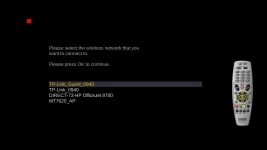
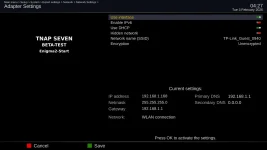
The thing is though, it needs to work for everyone. The WIFI and wired LAN connections are giving people problems, and I do not know why. These screenshots are from the 0202 Image with NOTHING restored, Hence (Clean Install).
mini4k-wireless_20260203042436.webp

mini4k-wireless-connected_20260203042754.webp
 
I reinstalled the image from 02-02 Octagon SF8008.
There's still no network adapter selection, neither in the first nor in the second step.
My LAN port is damaged, so I want to connect via Wi-Fi.
 
My SF8008 is working OK. We need to get it working OK for you!!! Follow this path in the receiver Menus:
Main menu > Setup > System > Expert settings > Network > Network Settings
What do you see?
 
My SF8008 is working OK.
I updated it on February 3, 2026.
It didn't change anything.
There's some kind of error in the image.
All other OpenPLI, OpenATV, and derivatives don't have this problem.

Do a test on your own if you can.
Install the image without plugging the cable into the LAN port.
And see if the network manager works.
Because in my opinion, the reason I don't have these options is because
my LAN port is broken.
 
I updated it on February 3, 2026.
It didn't change anything.
There's some kind of error in the image.
All other OpenPLI, OpenATV, and derivatives don't have this problem.

Do a test on your own if you can.
Install the image without plugging the cable into the LAN port.
And see if the network manager works.
Because in my opinion, the reason I don't have these options is because
my LAN port is broken.
Thanks for the detailed testing. This isn't an image bug - it's a hardware initialization issue when LAN is broken. The Problem:
When your LAN port is damaged, the system may fail to initialize the internal WiFi (88x2cu driver) due to memory constraints, leaving you with NO interfaces.
What We're Doing:
I've enhanced the wifi-autoload script to:
1. Pre-load WiFi stack dependencies (cfg80211, mac80211)
2. Verify wlan0 appears after driver load
3. Force wlan0 UP even if unconfigured (makes it visible to NetworkAdapterSelection)
4. Log detailed failure info to /tmp/wifi-boot.log
The February 4th build (or later) will have these improvements.

Also, The network interfaces appear (whether they are connected or disconnected) when successfully initialized. So disconnecting the cable from the LAN port on the receiver will not make the LAN will not make the LAN connection invisible in Network settings. The image assumes the hardware that is supposed to be there is correct and in working order. Your LAN being broken to the point it is not even recognized by the receiver is at least part of the problem I think.

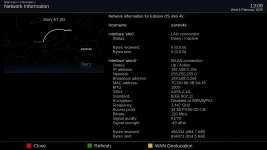
Shown below is what I have for TNAP-7. Both WLAN and LAN have been tested to work. Let's see if we can get a working WLAN for yourself. Knowing what version of SF8008 you have might help as there are three versions of SF8008, with each version being a bit different.
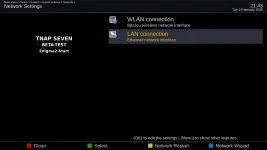
sf8008-network-interfaces_20260203214311.webp
 
Last edited:
That is a debug log. Thanks for sharing it. The skin needs some work. The big question is does wifi work now?
yes, it does after downloading the driver from plugins using wire connection.
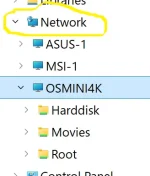
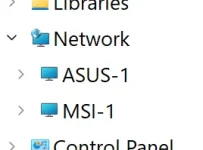
the only issue for now is that the box is not seen in the computer network (home lan).
No such issue with other images, but being a work in process....we need patience !
 
A debug log will most likely always be present in the receiver. If it says "debug", that is what it means. Crash is the most important. Both files though can be useful.

It is important probably as a next step to get both receivers set so you may transfer files to your local or network computer. I have no problem "Seeing" the receiver's files systems but I am running Linux. I imagine you are using some form of Windows, which may take additional settings entries in the receiver's menus. Also verify telnet works for each receiver. and disable any Network interfaces that are not being used as having both interfaces active can cause connection issues.
 
0204 Images are available in the receiver and on tnapimages.com. Attempts in this version have been made to make the wireless network interface visible in the sf8008 when the LAN is not present. (I have no way to test this.)
Tweaks to the SF8008, and similar receivers such as ustym4kpro should result in a smoother and more responsive remote. Features have been added inside the Network interfaces. This will be a good image to build upon as it has a very good foundation..

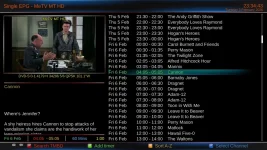
tnap-7-epg_20260203233443.webp

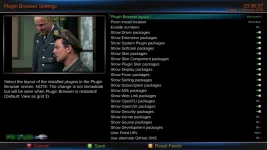
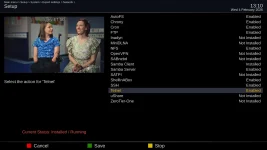
plugin-browser-settings_20260203233637.webp
 
"Attempts in this version have been made to make the wireless network interface visible in the sf8008 when the LAN is not present."
I hope this improuvement goes for osmini4k also.
 
The Edision osmini4k WIFI is about as improved as it is going to get unless more information can be given about it. Describe what you are or are not seeing. Provide crash logs if it crashes. I have no idea what needs to be improved on it now. Be glad to keep working on it if you can tell me what it needs... My Mini4k wireless works, but I normally use LAN.

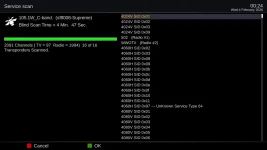
Satellite blindscan and Service scan have been adjusted somewhat. A blindscan of 105w returns over 2000 services which is good. Positioner setup is broken. The Edision 4K receivers may have erratic signal readings because of yet-to-be-completed customization for signal below lock. A bunch of little things left to do...Almost a solid week was spent on WIFI or Networking. And the Edision Mini4k still has WIFI issues??? We will see... What does it need???

105w-blindscan-2091-services_20260204002444.webp
 
Unfortunately,
Today's Octagon version didn't fix my problem.
Maybe if there was an option to save Enigma_debug to USB,
I could send the log, and that would explain something.
If you have the original Octagon SF8008 I looked up the wlan driver and it shows rtl8192eu and I see that driver in the download plugins so it is probably not installed already. Tried downloading it through terminal but I couldn't figure out that command to get it to downloaded so maybe EB can post it and you can install via usb.
 
I decided to install wifi driver, on osmini4k, to see if it works
I'm still using 0202 image, downloaded kernel-module-rtl8192cu from telnet

Code:
TNAP 7 osmini4k

osmini4k login: root
Password:
root@osmini4k:~# lsusb
Bus 003 Device 001: ID 1d6b:0001 Linux 5.15.0 ohci_hcd Generic Platform OHCI controller
Bus 001 Device 001: ID 1d6b:0002 Linux 5.15.0 ehci_hcd EHCI Host Controller
Bus 001 Device 002: ID 7392:7811 Realtek 802.11n WLAN Adapter
Bus 004 Device 001: ID 1d6b:0001 Linux 5.15.0 ohci_hcd Generic Platform OHCI controller
Bus 002 Device 001: ID 1d6b:0002 Linux 5.15.0 ehci_hcd EHCI Host Controller
root@osmini4k:~# opkg install kernel-module-rtl8192cu
Installing kernel-module-rtlwifi-5.15.0 (5.15) on root
Downloading http://162.216.113.217/tnap-7/osmini4k/kernel-module-rtlwifi-5.15.0_5.15-r0.1_osmini4k.ipk.
Installing kernel-module-rtl8192c-common-5.15.0 (5.15) on root
Downloading http://162.216.113.217/tnap-7/osmini4k/kernel-module-rtl8192c-common-5.15.0_5.15-r0.1_osmini4k.ipk.
Installing kernel-module-rtl-usb-5.15.0 (5.15) on root
Downloading http://162.216.113.217/tnap-7/osmini4k/kernel-module-rtl-usb-5.15.0_5.15-r0.1_osmini4k.ipk.
Installing kernel-module-rtl8192cu-5.15.0 (5.15) on root
Downloading http://162.216.113.217/tnap-7/osmini4k/kernel-module-rtl8192cu-5.15.0_5.15-r0.1_osmini4k.ipk.
Configuring kernel-module-rtlwifi-5.15.0.
Configuring kernel-module-rtl-usb-5.15.0.
Configuring kernel-module-rtl8192c-common-5.15.0.
Configuring kernel-module-rtl8192cu-5.15.0.
root@osmini4k:~#

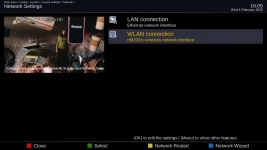
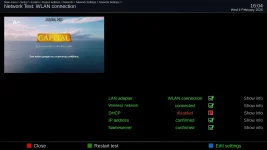
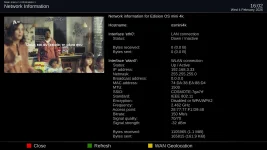
network_settings.webp wlan_test.webp wlan_info.webp

It's working, it did crash while setting up
 

Attachments

The Edision osmini4k WIFI is about as improved as it is going to get unless more information can be given about it. Describe what you are or are not seeing. Provide crash logs if it crashes. I have no idea what needs to be improved on it now. Be glad to keep working on it if you can tell me what it needs... My Mini4k wireless works, but I normally use LAN.

Satellite blindscan and Service scan have been adjusted somewhat. A blindscan of 105w returns over 2000 services which is good. Positioner setup is broken. The Edision 4K receivers may have erratic signal readings because of yet-to-be-completed customization for signal below lock. A bunch of little things left to do...Almost a solid week was spent on WIFI or Networking. And the Edision Mini4k still has WIFI issues??? We will see... What does it need???

View attachment 19550
After the clean flash/install, wifi is not active due to missing driver. So, to download the driver from plugins list, the box must have lan(wire) connection. At this stage, the box is visible in computer network menu (see wire pic) & dreamse & DCCe2.
Wifi & lan, both work on mini, and being able to connect with Dreamset & DCCe2 software to do the changes/updates.
After wire is deactivated and the only connection left is wifi, the box is not wisible in the computer (see wifi pic)!
Not a biggy, but this is not happening with other images or in mio4k+.
 

Attachments

  • wire.webp
    wire.webp
    13.1 KB · Views: 3
  • wifi.webp
    wifi.webp
    6.9 KB · Views: 2
  • wifi2.webp
    wifi2.webp
    84.4 KB · Views: 0
  • networkservices.webp
    networkservices.webp
    86.1 KB · Views: 0
I decided to install wifi driver, on osmini4k, to see if it works
I'm still using 0202 image, downloaded kernel-module-rtl8192cu from telnet

Code:
TNAP 7 osmini4k

osmini4k login: root
Password:
root@osmini4k:~# lsusb
Bus 003 Device 001: ID 1d6b:0001 Linux 5.15.0 ohci_hcd Generic Platform OHCI controller
Bus 001 Device 001: ID 1d6b:0002 Linux 5.15.0 ehci_hcd EHCI Host Controller
Bus 001 Device 002: ID 7392:7811 Realtek 802.11n WLAN Adapter
Bus 004 Device 001: ID 1d6b:0001 Linux 5.15.0 ohci_hcd Generic Platform OHCI controller
Bus 002 Device 001: ID 1d6b:0002 Linux 5.15.0 ehci_hcd EHCI Host Controller
root@osmini4k:~# opkg install kernel-module-rtl8192cu
Installing kernel-module-rtlwifi-5.15.0 (5.15) on root
Downloading http://162.216.113.217/tnap-7/osmini4k/kernel-module-rtlwifi-5.15.0_5.15-r0.1_osmini4k.ipk.
Installing kernel-module-rtl8192c-common-5.15.0 (5.15) on root
Downloading http://162.216.113.217/tnap-7/osmini4k/kernel-module-rtl8192c-common-5.15.0_5.15-r0.1_osmini4k.ipk.
Installing kernel-module-rtl-usb-5.15.0 (5.15) on root
Downloading http://162.216.113.217/tnap-7/osmini4k/kernel-module-rtl-usb-5.15.0_5.15-r0.1_osmini4k.ipk.
Installing kernel-module-rtl8192cu-5.15.0 (5.15) on root
Downloading http://162.216.113.217/tnap-7/osmini4k/kernel-module-rtl8192cu-5.15.0_5.15-r0.1_osmini4k.ipk.
Configuring kernel-module-rtlwifi-5.15.0.
Configuring kernel-module-rtl-usb-5.15.0.
Configuring kernel-module-rtl8192c-common-5.15.0.
Configuring kernel-module-rtl8192cu-5.15.0.
root@osmini4k:~#

View attachment 19551 View attachment 19552 View attachment 19553

It's working, it did crash while setting up

The Edision osmini4k is built with these drivers installed as of 0204:
enigma2-plugin-drivers-network-usb-asix all 1.0-r0
enigma2-plugin-drivers-network-usb-ath9k-htc all 1.0-r0
enigma2-plugin-drivers-network-usb-smsc75xx all 1.0-r0

Attempts to add more than that resulted in image failing to build.
Why the crash happened in 0202:

The most likely scenario is one of these:
1. The 0202 image had older code with direct access status[self.iface]["channel"] instead of .get()
2. There's a code path I haven't seen yet that does direct access
3. Line numbers shifted between versions

All three of your logs point to the same problem that should be fixed or repaired.
 
Back
Top